RiverWeb: Navigating Through the Mississippi

Using the RiverWeb CD-Rom

To receive the most benefit from using the RiverWeb CD-Rom it is helpful to understand its intent, structure, and components. Click on any of the topics below to learn more about them.

Table of Contents

Intended use of the RiverWeb CD-Rom

We intend the American Bottom Landing Site CD-Rom to demonstrate how the RiverWeb model, a much larger information archive about the Mississippi River Basin, might function. This CD-Rom provides a brief sample of the dynamic on-line capabilities and content that we will implement in the RiverWeb model.

Site Structure and Navigation

The American Bottom Landing Site is but one of many possible stopping points in a multi-dimensional, interdisciplinary network of Mississippi River history and lore, richly linked to on-line, multimedia resources in literature and the arts, as well as to geographical information. As a landing site the American Bottom component reflects a structure analogous to rivers themselves. RiverWeb acts here as the electronic river, connecting to multiple landing sites, each featuring different electronic archives of information about particular regions along the length of the Mississippi River. Thus we reproduce electronically the natural system of river and river settlements.

Traveling through the information in the American Bottom Site is easy. You can move throughout the site by clicking on the Next and Previous buttons or you may click on any hypertext, that is, text that is blue in color and changes your cursor or arrow to a hand with a pointing finger icon. Both navigation buttons and hypertext will be available at the bottom of every page on the CD-Rom. Once you move beyond the top pages of the CD-Rom you can navigate from the top of each page using the RiverWeb header. On the left side of the header you will see the RiverWeb logo and your location. Beginning in the middle of the header and proceeding to the right side are four navigation button images. Moving your cursor over an image will highlight the image and clicking on the image will move you to the top of the section it represents. In order, the images are linked to Culture, History, Science, and Navigation. Finally you may use the Site Map to navigate; see below for more details.

Within the American Bottom Landing Site the information is organized into four sections: History, Culture, Archives, and Guides.

History and Culture

The History and Culture sections contain narrative histories about aspects of the American Bottom region. Within these narratives are a variety of links to information about the historical interpretation being presented and information that goes into more detail about related topics. You may follow any of the narratives to their end, move among them as they interrelate through links, move into the Archives to explore historical material in more depth, and move outside the RiverWeb CD-Rom by following outside links.

Archives

The Archives section will eventually contain the data with which we construct the narratives. This archival information is the building material for our presentations and it is accessible for the users to create original interpretations. Currently, the archival material available represents only a portion of the possible source materials RiverWeb will make available.

Search

Also available from the top page of the CD-Rom is a search tool. You may search the contents of the RiverWeb site for particular words, and you can also confine your search to text, images, or movies only.

RiverWeb Guides

Student and Teacher Guides are accessible from the top page of the CD-Rom. The guides help students and teachers integrate RiverWeb materials into their learning experience with helpful suggestions, explanations, and additional resources.

Page Grabber

The page grabber is a simple demonstration of an interactive tool that allows you to organize RiverWeb material into your own presentation. The page grabber is located on the RiverWeb header in the far right corner. Three buttons, Add, View, and Purge appear in the corner. By clicking on the Add button you will add the page you are viewing to your presentation. Clicking the Purge button will delete your presentation and clicking the View button will run your presentation.

Outside Links

Whenever you select a link that leaves the RiverWeb site a new browser will open. This will help you keep track of material both from RiverWeb and from outside. The only exception to this is the within the Guides. The RiverWeb model will make a distinction between itself and all outside links.

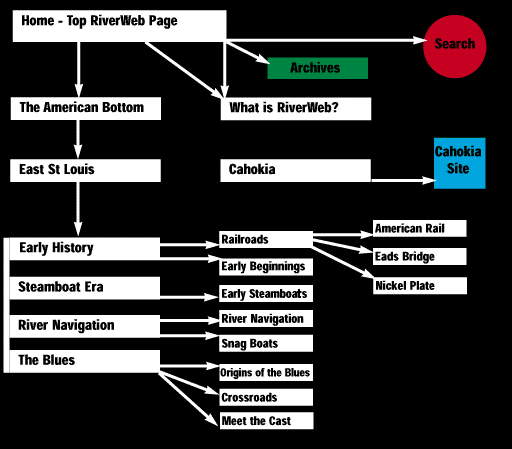
Site Map

You may select the site map from the top page. This opens a new browser window, which contains a graphic image represents the American Bottom Landing Site organization. Clicking on the various parts of the map will move your main browser window to that particular part of the site. You may leave the site map window on your screen as a remote control for navigating RiverWeb. The site map will help you visualize how we have arranged the information in the site and offers another means of fast navigation.

Enlarging Images

There are many images throughout the American Bottom Landing Site. Images are more than just pleasing additions to the text, they convey important information that is otherwise unavailable. The limited space of web pages led us to keep the images fairly small on pages with text. However you may click on most images to reveal their actual size and detail. Some images may not have information about their source, but all material in the RiverWeb model will have proper citations regarding their origin.

Sound and Video

Some sections of the American Bottom Landing Site contain sound and video clips. Here is a listing of all the digital media in the RiverWeb CD-ROM

Cahokia

The early history of the American Bottom region centers on the Cahokia mounds. You will notice that the organization of this section is different from the rest of the American Bottom Site. Materials relating to settlement in Cahokia are organized by theme and chronology. This reflects another approach to organizing material with which we are experimenting. To keep this organizational scheme distinct, selecting the Cahokia materials will open a new browser.

| Home | History | Culture | Archives | Guides | Search |


National Center for Supercomputing Applications
Copyright 1995, The Board of Trustees of the University of Illinois